
What Is Keyword Cannibalization, and How Do You Fix It?
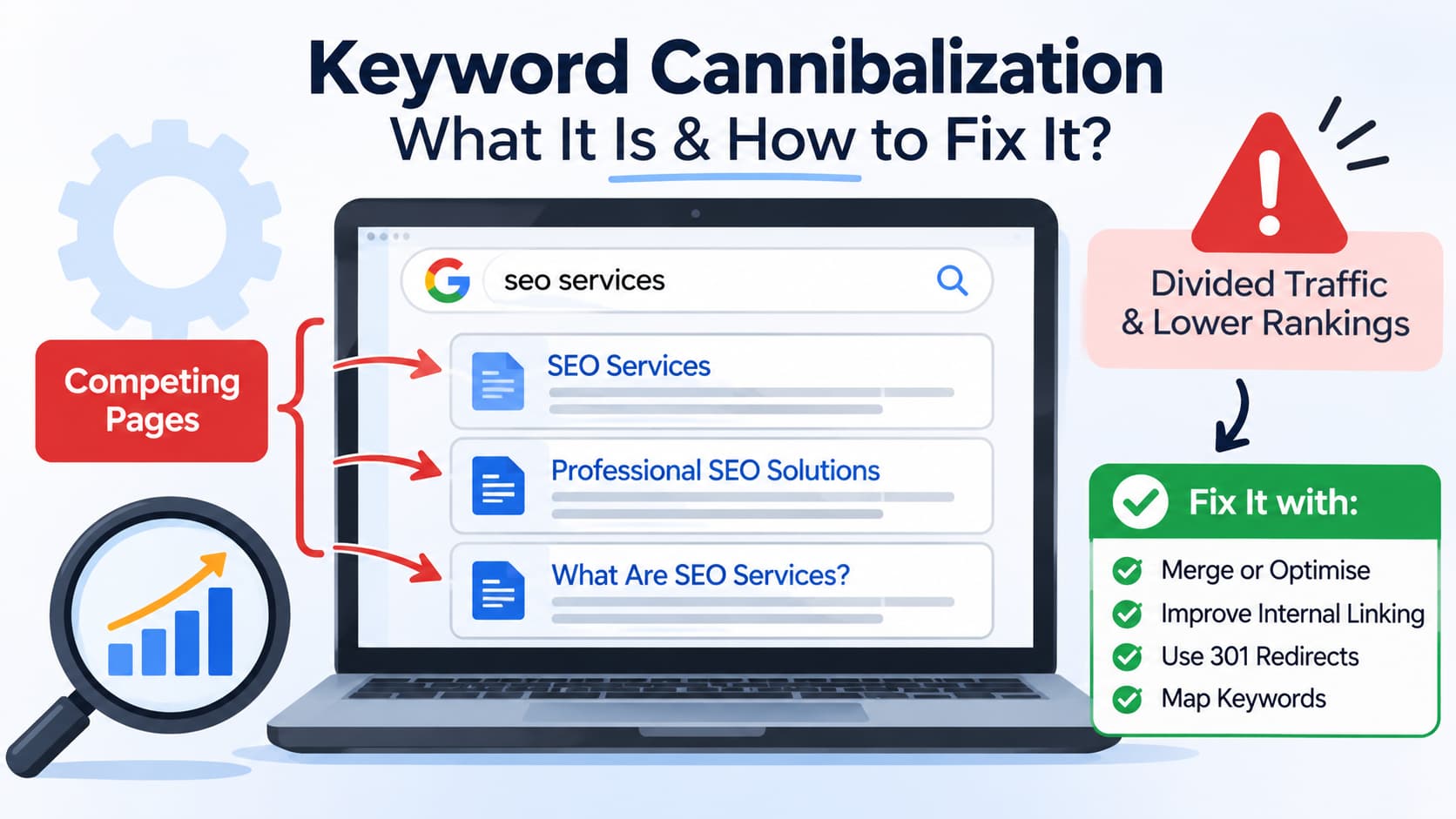
Keyword research is a fundamental part of any successful SEO strategy. Once businesses have identified what people are searching for they can create content that matches. However, if multiple pages are created using similar keywords without a solid content strategy in place, this can cause an issue known as keyword cannibalism.
Keyword cannibalism is when multiple pages on the same site are targeting the same or very similar search terms. This can cause confusion rather than boosting your website’s traffic.
This can cause issues for businesses investing into SEO by causing irregular ranking, less organic traffic and missing out on potential new customers.
The good news is that many times keyword cannibalism can be identified and resolved by performing a structured SEO Audit, content optimisation and improved keyword mapping.
In this guide we will look at what keyword cannibalism is, why it happens, how to identify it and what actions you can take to fix it.
What Is Keyword Cannibalization in SEO?
Keyword cannibalization refers to an SEO issue that occurs when multiple pages are targeting the same primary keyword (or search intent).
Let’s say we run a digital marketing agency, and have written the following blog posts:
- What is Local SEO and Why Your Business Needs it
- A Complete Guide to Local SEO Services For Small Businesses
Both of these pages will likely be targeting similar keywords e.g. local SEO, local SEO services and local SEO for small businesses.
If there is a lot of similarity in the content and search intent between both pages, search engines will struggle to identify which page is the best result for your search term.
Pages will then start competing against each other. One page may be ranking for a keyword today but a different page may take over later on. Both will also have less clicks compared to one optimised page.
However, having multiple pages targeting the same keyword doesn’t necessarily mean they are suffering from cannibalization. Search engines can actually show multiple pages from the same website if they are targeting different searches and have a unique purpose.
An issue will occur if pages have similar purposes.
How Does Keyword Cannibalization Affect SEO?
Keyword cannibalisation can impact a number of areas on your website. Whilst it will not directly penalise you in search engines, it can make your SEO strategy less effective.
Below are just some of the main impacts of keyword cannibalism to expect on your website.
1. Multiple Pages Trying to Rank for the Same Keywords
Having multiple pages which target the same intent can cause competition between pages.
For example, having two pages targeting the same keywords such as ‘web development services’ can cause search engines to show different pages depending on the search query and other ranking factors.
This means you won’t get much consistency with your rankings and neither page will rank strongly.
2. Organic Traffic Spread Across Multiple URLs
Instead of having one highly useful page receiving traffic, your website may have multiple pages competing for clicks and impressions.
You may have one page receiving traffic however another page will also gain some traffic.
This can make it difficult to create a high quality, authoritative landing page.
3. Backlinks Spread Across Multiple URLs
Backlinks play a huge role in SEO and can help search engines understand how authoritative your page is.
If you have multiple URLs on different websites linking to multiple pages on the same topic, you may lose some of the strength you could have given to one main page.
Whilst it doesn’t mean all your backlinks need to be going to the same page, by consolidating your content you can ensure you have the most relevant backlinks going to one page and using your internal authority effectively.
4. Search Engines Could Show You the Wrong Page
You may have a specific landing page for your SEO services. However, if you start seeing a generic blog post showing up in search engines for the same commercial keyword.
This blog post may not be set up to drive enquiries or give enough details about your services.
This can cause people to be sent to the wrong page and reduce your chances of conversion.
5. Difficult to Understand How Your SEO is Performing
By having multiple pages targeting similar keywords it can be difficult to see what content is performing well.
You may struggle to see:
- What URL is getting the most relevant organic traffic.
- Which page is driving the most enquiries/sales.
- Which page to further optimize.
- Whether any recent changes to your content have helped.
Having a clear structure in terms of keywords to pages makes it easier to understand how your SEO is performing.
Common causes of keyword cannibalisation
Typically keyword cannibalisation occurs over time. As more content is posted, pages are updated and keywords are targeted.
However, if you do not regularly review your content then cannibalisation can occur.
Common causes of keyword cannibalisation.
1. Duplicate blog posts.
One of the most common causes is having multiple posts on very similar topics:
- The benefits of local SEO for Small Businesses
- Why Local SEO Is Important to Small Businesses
- How Local SEO Helps Small Businesses Grow.
Although the post titles are different, the content could be very similar and the same search intent.
Before posting new content always check your existing content to see if you have already covered the topic.
2. Lack of keyword mapping.
Keyword mapping is when you map out which keywords will go to the most relevant pages. This includes mapping out primary and secondary keywords.
If you don’t have keyword mapping, your writers and SEO team may not realise that multiple pages are using the same primary keyword.
For example, your website could have 3 pages targeting the same keyword ‘digital marketing agency’ however they should have different purposes.
A good keyword map will avoid this.
3. Multiple pages for the same type of service.
Some businesses may create multiple landing pages for very similar services:
- SEO Services
- Search Engine Optimisation Services
- Professional SEO Solutions.
If the services are the same and targeting the same audience then this can cause cannibalisation.
You should only have separate pages for different services if they are targeting completely different customer needs, services and search intents.
4. Website redesigns.
When you redesign a website, keyword cannibalisation can occur if old URLs are still live. For example, a company may create a new page for a service however forget to redirect the old page.
Both URLs will be indexed and competing for similar searches.
All website migrations/redesigns should include proper redirects.
5. Lack of internal linking.
Internal linking helps search engines understand how your website is built and what pages link to what.
If multiple pages are using the same anchor text to link to different URLs, or important pages aren’t being linked to much then your website content hierarchy may not be clear.
Internal linking should help users and search engines find the most relevant pages for each topic.
How do I Find Keyword Cannibalisation?
Firstly we need to find out what pages are causing the cannibalisation issues so we can fix them.
There are 5 methods to finding potential issues:
1. Google Search Console
Using Google Search Console is one of the easiest ways to find out if there are any potential keyword cannibalisation problems. It will show how your site is performing in search engines.
- Head to Google Search Console.
- Select your website.
- Click on Performance.
- Click on ‘Search results’.
- Select a query.
- Click on Pages.
- Look at the URLs that are getting impressions and clicks for that query.
If you notice multiple URLs getting impressions for the same keyword, look into the content to see if they are overlapping.
For example if you search for local SEO services and you can see that there are 3 URLs getting impressions, this could be potential cannibalisation. However you want to check the content, rankings and purpose of the pages before making any changes.
2. Using a Google Search Operator
You can use Google search operators to see what pages are mentioning your keyword.
Simply search:
site:yourwebsite.com “target keyword”
For example:
site:itpyramid.com “local SEO”
This may show you some pages that mention the target keyword. Look through the pages to find any articles or service pages that are talking about similar topics.
This can be useful to find potential overlapping pages but will not show you if they are actually competing for organic rankings.
3. Keyword Mapping Spreadsheet
If you have a keyword research spreadsheet, check what primary keywords are mapped to each URL.
Check if there are:
- Multiple pages with the same primary keywords.
- Similar keywords mapped to the same intention.
- Multiple blog posts on the same topic.
- Service pages using almost the same search terms.
Having a keyword mapping spreadsheet can help to see any overlaps.
4. SEO Audit Tool
Using SEO tools like Semrush and Ahrefs can help you to see what keywords are ranking, and multiple URLs showing up for similar search terms.
They can show you what keywords are ranking, what URLs are competing, how much organic traffic they are receiving and their keyword position. They can also show you what backlinks they have, and how the content is performing.
Use these reports as a starting point and then look at the pages manually.
5. Search Intent and Content
The most important part is to work out why there is overlapping content.
Ask yourself:
- Are they providing answers to the same question?
- Are they targeting the same audience?
- Are they providing similar information/services?
- Are they trying to attract the same type of visitors?
- Would it be better to have one page with all the information?
If you are finding that most of these answers are yes then you may need to merge or adjust the pages.
How to Fix Keyword Cannibalization (7 Methods)
When you find some competitive pages, you want to decide what method to adopt based on the content, purpose, performance and value.
Sometimes you won’t need to delete or merge any pages. All you need to do is make a few edits:
1. Merge Similar Pages
If there are two or more pages with very similar content, then merging could be the best fix.
For example, if you have:
- What Is Technical SEO?
- Technical SEO Best Practices
- Beginners Guide to Technical SEO
All three pages may be targeting the same search intent. In this case, you’d want to create a single comprehensive guide that contains the most useful information from all 3 pages.
You can do this by:
- Reviewing all the content on the pages.
- Finding useful content.
- Removing duplicated or outdated content.
- Creating a detailed page.
- Updating your internal links to point to the preferred page.
- Creating 301 redirects to relevant pages.
This will give a better user experience but retain the useful information.
2. 301 Redirect
A 301 redirect will permanently send users and search engines to another page.
If you’re merging similar pages or removing old content, this can be useful.
For example:
- Old Page:/technical-seo-guide/
- New Page: /technical-seo-services/
If you’re permanently replacing the old page with the new page, then using a 301 redirect will ensure users and search engines are sent to the correct pages.
Ensure you’re only redirecting to relevant pages. Don’t redirect pages to a generic homepage if they don’t have any relevance.
3. Optimize Content to Target a Different Search Intent
Sometimes there may be two pages that are targeting similar keywords but have a different purpose.
In this case you may not need to merge them, but instead optimize them to have a clearer search intent.
For example:
| Page | Primary purpose | Search intent |
| What Is Local SEO? | Explain the concept | Informational |
| Local SEO Services | Promote agency services | Commercial |
| Local SEO Pricing | Explain service costs | Commercial / transactional |
Each page is targeting a different audience based on the purpose.
To avoid content duplication:
- Create a clear main keyword.
- Use unique titles and meta descriptions.
- Ensure the content reflects the purpose of the page.
- Use relevant headings and examples.
- Utilize internal links.
This will help each URL to have a clear reason to exist.
4. Improve Internal Links
Using internal links can help to show which pages are most important.
If you have a main service page with multiple blog posts supporting it, then include links from relevant articles to the main service page using descriptive anchor text.
For example:
- Main Page: Local SEO Services
- Articles:How Local SEO Can Help Small Businesses
- Local Keyword research – Beginners Guide
- How to Optimize Your Google Business Profile
These can be linked back to the main page where relevant.
This will create a clearer structure and help visitors find related information.
Don’t force exact match anchor text. Ensure the anchor text is natural and accurately describes where it is going.
5. Update Title Tags & Meta Descriptions
Using title tags and meta descriptions will help show what the page is about.
Having multiple pages with similar titles and descriptions can make it difficult to see what the focus of the page is.
For example:
Page 1:
Title: Local SEO Services for Small Businesses
Description: Boost local search visibility with targeted SEO strategies helping small businesses to attract local customers.
Page 2:
Title: What Is Local SEO? A Guide For Business Owners
Description: Learn what Local SEO is, why it is important and how businesses can boost their visibility.
This will help to show the difference between the purpose of both pages.
However, just changing the metadata won’t fix severe duplication issues. This should be used as part of an overall optimization strategy.
6. Canonical Tag
A canonical tag will tell search engines which URL should be seen as the preferred one.
For example, on an E-commerce site there may be multiple URLs for the same product due to different tracking parameters or sorting options.
A canonical tag can be used to highlight the preferred page.
However, this is not a general solution.
If there are two pages with different content and search intents, then putting a canonical tag on one of them may not be the right choice.
Only use canonical tags if they are duplicate or near-duplicate pages.
7. Delete or Noindex Pages
There may be some pages that aren’t providing any value to the users anymore. Or they may be out-of-date.
If they’re not receiving any meaningful traffic, backlinks, conversions or useful information then you may wish to delete them.
Depending on your situation, you can:
- Delete the page and set the response to 404 or 410.
- Redirect to a relevant page.
- Noindex the page.
Before you delete any pages, take a look at the organic traffic, backlinks, internal links and conversions. If you delete useful content without considering the value it can cause more SEO issues.
Avoiding Keyword Cannibalization in the Future
As well as fixing any current issue you’re facing, implementing methods to prevent future keyword cannibalization will help improve the efficiency of your SEO strategy.
Here are some best practice steps you can take when planning your website content:
1. Keyword Mapping
Ensure every important URL has a main keyword and clear search intent.
Within your keyword map you should note down:
- URL
- Main Keyword
- Secondary Keywords
- Search Intent
- Audience
- Content Type
- Existing Ranking
Have a look at your spreadsheet before developing any new content.
2. Content Audits
This will help you get a better understanding of how your pages are doing and which ones need improving.
Look through your website every few months or if you have a lot of new content to add.
Identify any duplicated topics, old articles, dropping traffic and competing URLs.
3. Content Planning around Search Intent
Don’t automatically create a new article for a new keyword variation.
Understand what users would expect to see when searching for that keyword.
If two keywords have a similar search intent then you may only need one fully developed page. If they have a different search intent then they may require their own page.
4. Topic Clusters
Group together any relevant content.
For example if an agency is targeting SEO related searches they may have one main page for their SEO services and then other articles looking at technical SEO, local SEO, keyword research and on-page optimisation.
Each page should have its own focus but support the overall theme.
5. Keyword Check
Before creating a new blog post, search your website for any similar topics.
This will let you know if there is something you can update rather than creating a new article.
This helps avoid unnecessary duplication and keeps your website more organised.
Monitoring after you have made changes
Once you have made changes to your site you will want to monitor how your site is performing.
Using Google Search Console you can monitor:
- Impressions for the target keywords.
- Clicks and organic traffic.
- The average position for your keywords.
- What URLs are showing up for your key queries.
- How your individual pages are performing.
You can also look at your analytics data to see how users are interacting with the new pages. Are they performing any valuable actions such as filling out enquiry forms?
It can take some time for any changes to show in the search results. Try not to make constant changes straight after making updates. Give the search engines time to crawl and re-evaluate the updated pages.
Things to avoid when tackling keyword cannibalisation.
Here are some common mistakes to avoid when trying to correct keyword cannibalisation:
Removing pages without looking at how they performed: You might have pages that had useful backlinks or conversions.
Combining pages with different search intent: It’s possible you have pages with useful information and pages with useful service pages.
Using canonical tags on unrelated pages: Canonical tags are there to show which pages are duplicates or almost duplicates.
Changing URLs without redirects: Which can cause broken links.
Stuffing your site with exact match keywords: It’s more important to create natural and useful content.
Thinking that if you have multiple pages ranking it is an issue: Whilst it might seem like a problem, it’s actually perfectly reasonable to have multiple pages ranking on your site for related searches. Each page will provide unique value.
Ideally, you should have an improved content structure and better user experience.
Final Thoughts
Keyword cannibalization is a common problem to face when running regular content or having multiple related services.
Multiple pages will try to compete with each other for a similar search intent. This can cause inconsistency with rankings, traffic being split and important landing pages not performing to their potential.
The best way to combat this is to find out which pages are overlapping, determine what the search intent is and put the correct solution in place. This can include merging content, improving internal links, updating keywords, redirects and/or canonical tags depending on the content on your site.
IT Pyramid follows a structured approach to SEO. We can help you understand how each page performs towards your overall goals by carrying out keyword research, content audits, on-page optimisation and technical SEO. By doing this you can create a clearer structure to your website and content aimed at the right audience.
If you need help identifying any keyword cannibalization on your website then we can carry out an in depth SEO audit to help you identify any overlapping pages. We can improve your keyword targeting and create a more effective content strategy.


 I’ve gotten a number of works do e by Sandra Smith of IT Pyramid, from pictures, character designs and animations to vtuber models. The quality has always been top notch and i can’t recommend them highly enough.