
10 SEO Mistakes That Are Costing Your Website Rankings
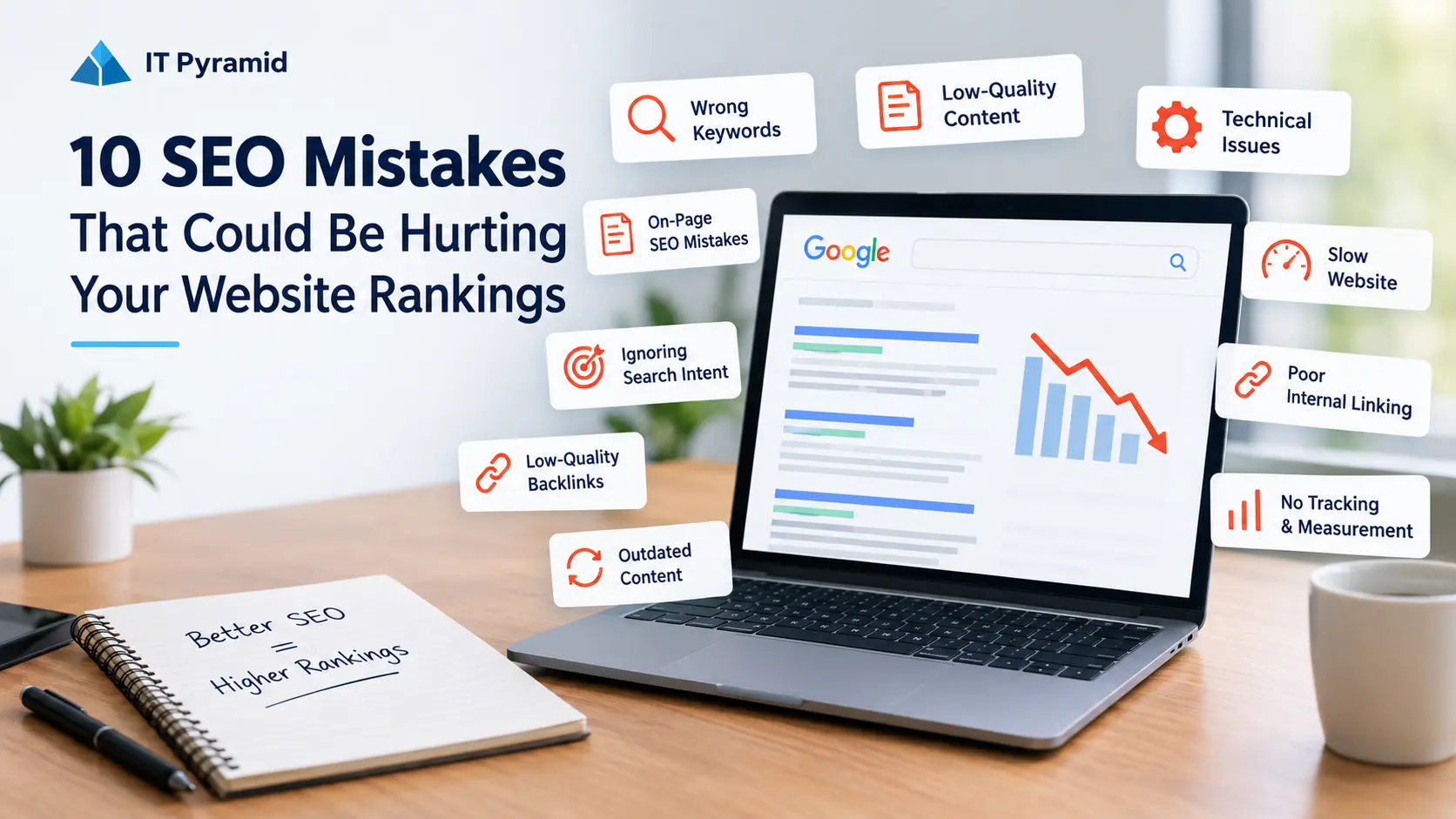
Having a website is a great way to establish an online presence, but it doesn’t guarantee discoverability and visibility. Your website needs to be indexed by search engines, relevant to your target audience, easy to navigate and use, and able to answer the questions potential customers may have.
Search engine optimization (SEO) is vital to helping businesses get found by search engines and attract the right kind of traffic to their website. However, many websites that have valuable products and services fail to get discovered by search engines or fail to attract enough relevant traffic due to common SEO mistakes.
The good news is that many of these issues can be easily resolved with a proper SEO strategy. The key is to understand what is impacting your website.
In this article, we will discuss 10 common SEO mistakes, why they can be detrimental to your online presence, and how to fix them.
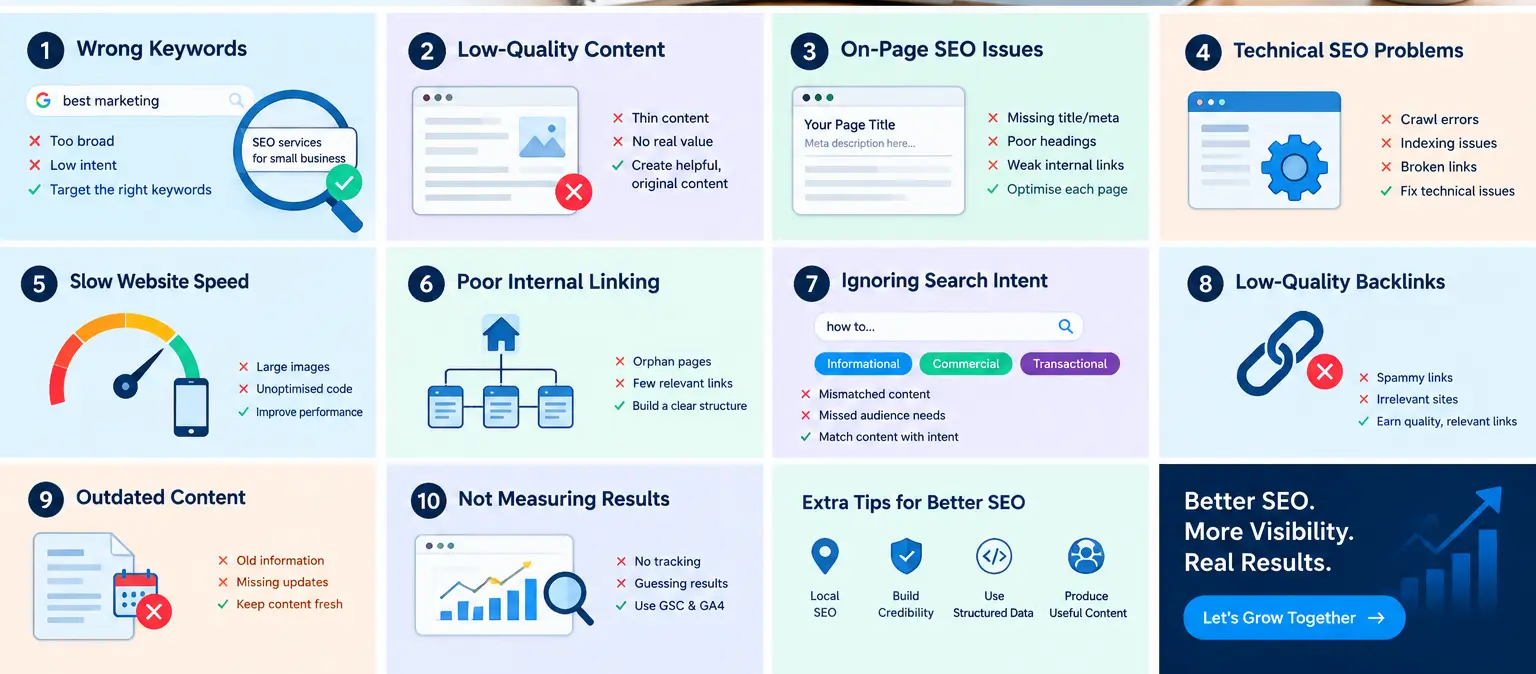
1. Targeting the Wrong Keywords
Keyword research is an essential part of any SEO campaign, helping to understand what potential customers are searching for, which keywords are relevant to your service offerings, and the type of content that will appeal to your target market
However, many businesses fail to conduct proper keyword research or use the wrong mix of keywords, which reduces traffic potential and the discoverability of individual pages.
For example, a digital marketing agency targeting Australian businesses may decide to optimize their content around the word ‘marketing’.
While this is a broad, popular keyword with thousands of monthly searches, it includes many variations irrelevant to a marketing agency, from definitions to educational courses to job opportunities.
How to Correct This Mistake
Identify your target market, desired service offerings, and content topics before conducting keyword research. Use Google Search Console, Google Keyword Planner, and relevant keyword research tools to find relevant keywords and assess their value using a combination of factors, including:
Search intent: Understand what potential customers are looking for and what they want to achieve by using specific keywords.
Search volume, relevance, and competition: Assess how many people are searching for specific keywords, whether the keyword is relevant to your service offerings, and what level of competition you will face.
Business value: Consider the potential value of a keyword, including whether it can attract relevant traffic and customers.
Assign a primary search intent to each page and optimize the content around relevant keywords, supporting topics, and questions to enhance the value and relevance of the content. Avoid targeting irrelevant or overly broad terms or topics.
2. Low-Quality or Unhelpful Content
Content is one of the most important aspects of SEO, helping search engines better understand the content and purpose of individual web pages while also helping potential customers find answers to their questions.
However, not all content is equal, and lengthy articles that feature little or no useful information or fail to address the needs of your target market will struggle to rank well, no matter how much time and effort is put into them.
For example, an article about local SEO may provide a definition of the term but fail to give any additional insight, including an explanation of Google Business Profile optimisation, local keyword research, reviews, or relevance, leaving the reader with more questions than answers.
How to Resolve This Issue
Create content that addresses relevant questions and demonstrates your expertise in the relevant area.
Before writing an article, ask yourself questions such as:
- What is the purpose of the article?
- What are potential customers looking for when searching for similar topics?
- What useful information, support, or services can the article offer?
- What actionable advice can I give to potential customers?
Make sure to use relevant examples and break down complex instructions in your articles and web pages. Where possible, focus on sharing unique insights, including photographs, videos, and other supporting material. Conduct regular audits of your content and update it where necessary, including correcting misleading or inaccurate information, removing or amending poorly written sections, and consolidating similar content where appropriate. Avoid simply producing more articles than your competitors; focus on creating better content that offers greater value to your target market.
3. Missing On-Page SEO Opportunities
On-page SEO is all about optimising individual web pages to ensure they perform as intended. It involves a variety of techniques to help search engines easily understand the content and purpose of individual web pages and enable customers to find what they are looking for.
Common mistakes in on-page SEO include incorrect or missing title tags, poor use of headings and subheadings, irrelevant internal links, and failure to address the primary search intent of the page.
For example, a website offering website development services will need to ensure that its web pages clearly communicate the intent and value proposition of the service, addressing relevant questions a potential customer may have. This cannot be achieved by simply using a generic title such as ‘Welcome to Our Website’.
How to fix it
Conduct a thorough review of all web pages and make sure that:
The title tag accurately reflects the content and value of the web page. While it is good practice to use a primary keyword in titles where relevant, avoid keyword stuffing or including multiple keywords unless it makes commercial sense.
The meta description accurately reflects the content and value of the web page and encourages visitors to click through. Google often generates its own description, and it is not a ranking factor, so it should be seen as more of a suggestion.
Web page content clearly states the purpose of the page, answers the main questions, and provides sufficient context, guidance, or support for the visitor.
The page features relevant internal links and avoids using irrelevant keywords for anchor text.
Image file names, image alt text, image size, and image quality are optimised.
The page uses descriptive headings and subheadings, including a single H1 tag for the page title and relevant H2/H3 tags for subheadings. Avoid using H1 tags in subheadings.
4. Poor Technical SEO
Technical SEO refers to a variety of SEO-related tasks that primarily affect the ability of search engines to correctly index and understand the content and purpose of web pages. A website with valuable content and strong SEO can still underperform significantly in search engine results due to technical SEO issues.
Some common technical SEO mistakes include incorrect index/noindex directives, incorrect canonical tags, broken links, redirect chains, duplicate URLs, and incorrect robots.txt or XML sitemap content.
A page that is mistakenly set to ‘noindex’ will not appear in organic search results, no matter how valuable it is. Similarly, a search engine will be unable to follow a redirect chain, making it impossible for customers to follow a natural discovery path suggested by the search engine.
Ways to Address the Problem
Use Google Search Console and a website crawler (such as Screaming Frog SEO Spider) to review the technical SEO health of your website. Pay particular attention to the following issues:
- Important pages are not blocked by robots.txt or are set to ‘noindex’.
- Correct canonical tags are used across all pages to define the preferred URL.
- Redirect chains, broken links, and redirects are corrected.
- XML sitemaps only include canonical URL links.
- The robots.txt file is correctly configured to avoid blocking important pages.
- Redirects are correctly configured and do not create redirect chains.
- Duplicate pages and content are correctly managed.
- Important pages have relevant internal links.
Use Google’s URL Inspection tool in Google Search Console to review the technical SEO health of your most important pages and request recrawling if significant changes have been made. Google Search Console will let you know if Google can crawl and index the page successfully, but it will not guarantee improved rankings or visibility. Technical SEO audits should be conducted regularly, especially after major technical changes are made to the website.
5. Poor Website Performance or User Experience
Customers will avoid slow-loading websites, intrusive pop-ups, confusing navigation, and websites that do not respond well to mobile devices. Google’s Core Web Vitals are an important ranking factor, but a great Core Web Vitals score is not enough on its own, and speed is only one part of a positive visitor experience.
A slow website on mobile devices will affect how potential customers interact with the website, including their ability to browse services or complete an enquiry.
What You Can Do Instead
Use Google PageSpeed Insights to test the performance of your most important web pages on mobile and desktop. Aim to achieve a score of 90 or higher for all three Core Web Vitals:
Largest Contentful Paint (LCP): This measures how quickly the page begins to load and should be lower than 2.5 seconds in most cases.
Interaction to Next Paint (INP): This measures how responsive the website is and should be under 200 milliseconds in most cases.
Cumulative Layout Shift (CLS): This measures visual stability and should be lower than 0.1 in most cases.
These are approximate thresholds, and actual performance depends on the 75th percentile of field data if field data is available.
Some practical solutions include optimising large images, eliminating render-blocking JavaScript, improving server response time, using browser caching, and avoiding unnecessary third-party JavaScript.
Make sure your website is mobile responsive and easy to navigate on smaller screens. Pay particular attention to navigation menus, CTA buttons, and contact details and ensure they are all mobile-friendly.
6. Poor Internal Linking
Internal links are links between web pages on the same domain. Internal links help both search engines and visitors discover related content and better understand the relationships between different web pages.
Common internal linking mistakes include failing to link blog posts to relevant service pages and failing to utilise links to help visitors discover related content. Some websites also mistakenly attempt to utilise a sitemap to promote individual pages, rather than utilising natural discovery and internal linking methods.
An article about local SEO may include a relevant link to a local SEO service page, helping visitors who are interested in hiring professional help to discover more information without additional effort.
How to Resolve This Issue
Develop a logical internal linking strategy that helps visitors discover related content. Start by identifying your most important service pages and review the relevant blog posts, case studies, and other content that can help provide additional information and support.
Use descriptive anchor text for internal links, such as ‘local SEO services‘, and avoid using the same exact-match anchor text in multiple links. Avoid linking to random pages with no real connection between the two pieces of content.
Conduct regular internal linking audits to identify and fix orphan pages, broken links, and pages with few or no internal links pointing to them. Group related content into topic clusters to help provide greater value and support to visitors. For example, a main SEO services page may link to additional content about keyword research, technical SEO, on-page SEO, and organic traffic generation, providing additional value and support beyond a simple service description.
7. Failure to Cater to Search Intent
Search intent is the reason why a visitor is searching for something on a search engine. A page with the correct keywords may fail to rank well if it does not address the specific needs and desires of the visitor searching for that page.
A search for ‘how to improve website rankings’ suggests that the visitor is looking for helpful information or advice, rather than an advertisement for an SEO agency. Conversely, a search for ‘SEO agency for small businesses’ may indicate that the visitor is looking to compare different agencies and their offerings and may want information on what each agency provides.
How to fix it
Search for your target keywords and review the types of content that are ranking on the first page of Google. Try to understand the intent behind each query and make sure that your page clearly addresses the visitor’s needs. For informational queries, focus on providing advice, useful information, and support. For commercial queries, provide relevant information about your service offerings, experience, and other relevant details where appropriate.
Avoid creating multiple similar pages to try and target slightly different search queries. Make sure that you clearly address the intent behind each query, rather than simply trying to match keywords or page topics.
8. Poor Backlink Profile or Website Authority
Backlinks are links from other websites to yours. Links from high-quality, relevant websites to yours tell search engines that your website is worth linking to by other websites. However, a large number of low-quality backlinks or unnatural links can actually hurt your SEO performance.
A web design agency specialising in WordPress may benefit from mentions or links from a relevant online magazine or website, particularly if the link comes from a page relevant to web design or development. In contrast, 100 links from unrelated directories would provide much less value and could potentially harm the website’s SEO performance.
Ways to Address the Problem
Focus on building natural, high-quality backlinks by creating useful content that other websites want to share. Some practical examples of building natural backlinks include:
- Publishing original research (particularly statistical research) or useful resources such as comprehensive guides or checklists.
- Creating useful content and encouraging other websites to link to it, including mentions in industry publications, articles, or case studies.
- Establishing strategic partnerships with other websites to build long-term link-building opportunities.
- Publishing expert commentary or opinion pieces on relevant topics, particularly on other websites that allow comment sections.
- Publishing original case studies that demonstrate the value of your services and provide useful insight into your approach.
- Using a backlink analysis tool to review your most important backlinks, referring domains, and lost backlinks.
Avoid using the disavow tool for low-quality backlinks unless you have carefully reviewed referring domains using a backlink analysis tool and clearly identified spammy or unnatural links that may trigger a Google penalty.
9. Failing to Update Old Content
Publishing an article is not the end of the story; it is vital to regularly update articles to ensure that they continue to provide value and support to your target market. Articles that feature outdated information, statistics, advice, or recommendations will fail to provide value to your visitors and can actually hurt your SEO performance. A popular article that previously performed well may also lose value if the search intent has changed or there is now more competition for similar queries.
However, it is important to note that not every drop in performance indicates a problem; there may be external factors beyond your control, such as seasonality, changing search intent, technical issues, and a variety of other causes.
Ways to Address the Problem
Use Google Search Console to identify articles that have seen a drop in traffic or impressions for important queries. Compare this to an equivalent period in the previous year or month and identify the queries and pages that are performing worse than before.
Review the content to understand whether it:
- Answers the main search intent for the query.
- Includes any outdated information, statistics, recommendations, or advice.
- Fails to provide information or support that the visitor may need.
- Has poor headings or an ineffective page layout.
- Has poor internal linking.
- Needs to be combined with another page or redirected if it has little or no useful information.
Update the content where necessary to improve the value, relevance, and support offered by the article. Avoid changing the publication date simply to improve the freshness score unless there is a valid reason to do so. Let Google re-crawl the page and allow enough time to see if the changes have had a positive impact.
10. Failing to Measure and Monitor Performance
One of the most common SEO mistakes is to implement changes and then fail to measure and monitor the impact. Articles, updated headings, and new internal links all contribute to better SEO, but it is impossible to know which changes have worked without measuring and monitoring performance.
Increased impressions for a particular query may seem like a positive change, but it does not necessarily mean that the article is attracting more visitors or that those visitors are relevant to the website.
How to fix it
Use Google Search Console and Google Analytics 4 to measure and monitor organic search performance and user behaviour.
In Google Search Console, look at:
- Organic search clicks and impressions.
- The click-through rate (CTR).
- The average organic search position.
- Queries and pages generating traffic or impressions.
- Changes in indexing and search performance.
In Google Analytics 4, look at:
- Organic Search sessions.
- Which landing pages attract visitors.
- User engagement.
- Important events and conversions, such as enquiries.
Review this information monthly and compare it to the equivalent period in the previous year or month. Record any significant changes in performance, including changes in organic search traffic volume, CTR, and the pages driving traffic. Identify any major SEO-related changes, such as technical improvements, page updates, and content publication dates, that may have contributed to these changes. Avoid focusing on a single metric, such as impressions, and remember that a drop in impressions or traffic can often be more impactful than an increase in impressions for a few keywords. A drop in sessions or impressions could indicate that your website is losing visibility, while an increase in CTR or engagement could demonstrate that your content is resonating well with your target market.
Additional SEO Checks Every Website Owner Should Consider
The 10 SEO mistakes above cover many common issues, but there are additional factors that are worth reviewing.
Local SEO signals
If you are targeting specific cities or regions, make sure that your website makes it clear where you operate and what services you offer. Keep your business information and Google Business Profile (if applicable) up to date. Publish location-specific pages when it makes sense to do so and avoid creating multiple identical-sounding city pages with little or no information.
Website credibility
Make it easy for your visitors to trust your business by providing accurate information, relevant case studies, testimonials, appropriate examples of past work, and clear contact information.
Structured data
Make sure to use relevant structured data formats for your content where possible, such as Organization, LocalBusiness, or Article schema. Test your structured data using Google’s Rich Results Test, if applicable. Structured data makes it easier for search engines to understand page content, but it is not a ranking factor, and it will not guarantee rich results or higher rankings.
How to Create a Practical SEO Improvement Plan
Having identified some of the potential issues, it is time to create a plan and begin making improvements. Rather than trying to fix everything at once, it is a good idea to prioritise the most impactful changes. A simple four-week plan can help you get started.
Week 1: SEO Audit
- Review Google Search Console and GA4 performance.
- Identify pages with a declining number of visitors or impressions for important queries.
- Conduct a technical SEO audit of the website.
- Conduct keyword research.
Week 2: Fixes
- Address significant technical and indexation issues.
- Fix titles, headings, and content.
- Optimise your most important service pages.
- Fix mobile usability issues and page performance issues.
Week 3: Content and Authority Building
- Update old or poor content.
- Publish useful supporting content.
- Fix internal linking issues.
- Identify relevant backlink, partnership, and guest post opportunities.
Week 4: Measurement and Reporting
- Review performance improvements and compare them to the previous equivalent period.
- Review impressions, traffic, and CTR.
- Measure changes in Google Search Console and Google Analytics 4.
- Measure enquiries and other business outcomes.
- Document completed tasks and improvements and identify priorities for the next four weeks.
Keep in mind that SEO rarely follows a predictable pattern or timeline. This is a practical starting point, but every business is different, and it should be used as a guide rather than a guarantee of first-page rankings within a month.
Conclusion
Website rankings can be impacted by a variety of issues, ranging from targeting the wrong keywords and publishing low-quality content to poor website performance and a lack of measurement and analysis. The good news is that most of these issues can be resolved with a comprehensive SEO strategy. Focus on conducting keyword research, creating value-packed content, improving on-page SEO, and reviewing your technical SEO. Strengthen your internal linking, build high-quality backlinks, update old content, and measure and monitor your performance using Google Search Console and Google Analytics 4. By taking these steps, any business can start to see real results in attracting relevant traffic to their website.





 I’ve gotten a number of works do e by Sandra Smith of IT Pyramid, from pictures, character designs and animations to vtuber models. The quality has always been top notch and i can’t recommend them highly enough.